
I had a project recently where I shot some images of jewelry for a company selling their products online. As most of your are doing design work, this might be a project you’ll undertake some day. Even if you don’t shoot the pictures, I wanted to talk about some of the pieces involved in the shoot other than the camera itself.
Shots like this require the camera to be steady. I prefer to use a remote trigger for the camera so I’m not even physically pushing the button. To keep it perfectly steady, it is important to have the camera mounted on a quality tripod. Not sure what tripods are best? Check out a previous post I wrote on Tripods.
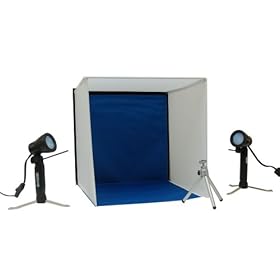 When you are shooting small products, it is important to get the lighting just right and one of the best ways is with a Portable Lighting Studio. I have the unit pictured at right and it is no bigger than a briefcase so it is easy to take to a shoot.
While the Portable Lighting Studio comes with small lights, they just aren’t enough for me. So I also bring along a much more powerful light. I wrote about a kit of fluorescent lights in Photo/Digital Video Lighting Kit and I only need one of the lights for a project like this.
After I take the photos in RAW format, I need a powerful tool to process the photos. For that, I use Corel AfterShot Pro. It will convert the images I’ll be using to a 48-bit TIF file and then I’ll use Corel PHOTO-PAINT to cut out the images.
Last, but certainly not least, I need to get paid. If I want to receive payment by credit card while out of the office, I’ll attach my Square Card Reader and process the client’s card on the spot.
While this list of equipment sounds like a lot, it is all very portable so it isn’t difficult at all to get everything set up and ready to shoot!







0 Comments